Keleuo

Open source desktop app

Your coding agents, with your project beside it.

Keleuo is a small, very fast desktop app for working with coding agents. Each session is its own workspace with its folder, conversation, terminals and files, and you can see at a glance which sessions are working, which need you, and which are done.

See the app Download

The name comes from the Greek keleuo, "to command, to urge". You direct, the agent builds, and you watch it come together.

Keleuo assembling a workspaceAn isometric voxel scene. The little cube cursor from the Keleuo icon stands on a periwinkle platform, beside a billboard with the app icon, while a golden crane lifts blocks labelled Sessions, Skills, Agent, Code and Terminal into a row, one by one, until the workspace is complete. Two status tags read: Fix login bug, working; Release notes, needs you.SessionsSkillsAgentCodeTerminal>_Fix login bug · workingRelease notes · needs you
A workspace, one block at a time.

What Keleuo looks like

The Keleuo window. On the left, a list of sessions with their folder and branch. Next to it, the project's file tree and an Agent panel listing earlier sessions in this folder. On the right, the agent chat: a request to run two subagents, each shown as a collapsible card with its tool calls, then the agent's summary, and an Edit card with a red and green diff of greet.py.
  1. 1Sessions Each one keeps its own folder, branch, conversation and layout.
  2. 2Project Files, skills and earlier sessions for the folder you are in.
  3. 3Agent Tool calls as cards, subagents as they run, real diffs.

What is in the window

Everything an agent session touches, in one place.

Keleuo does not replace the agent. It runs it, and puts the things you keep switching to right next to it.

  • Sessions as workspaces

    A session list on the left. Each session has its own folder, agent conversation, terminals, open files and layout, and a live dot that shows whether it is working, waiting for your permission, or idle.

  • Chat or terminal

    Chat view renders markdown, folds tool calls into cards, shows real diffs, turns file:line references into links and permission requests into buttons, and draws the subagent tree as it runs. Terminal view is the agent's own interface.

  • Your skills, in reach

    Every skill the project can use, from the project, your user folder and installed plugins, in one panel. Open a skill to read it, or edit it in place.

  • Code and terminals

    A file tree, an editor with syntax highlighting and go to definition, and real terminals. Every panel docks and splits by drag and drop.

  • Session browser

    Open any folder and see its running and recent sessions. Continue one, fork it, or start a new one in its own git worktree.

  • Not tied to one agent

    Keleuo talks to coding agents through an agent-neutral interface. Claude Code is the first one it supports.

A closer look

Chat and Terminal

One agent process, two views.

Read a session as a tidy chat, or drop into the agent's own terminal interface for slash commands and everything else it can do. Both views show the same running process, so switching is instant and nothing restarts.

Choose a view
Chat view: the request Terminal view of the same session: Claude Code's own screen, with its banner, the same request and answer, and a line reading Baked for 1s. The working folder path is blurred.

Permission prompts

Allow or deny with a click.

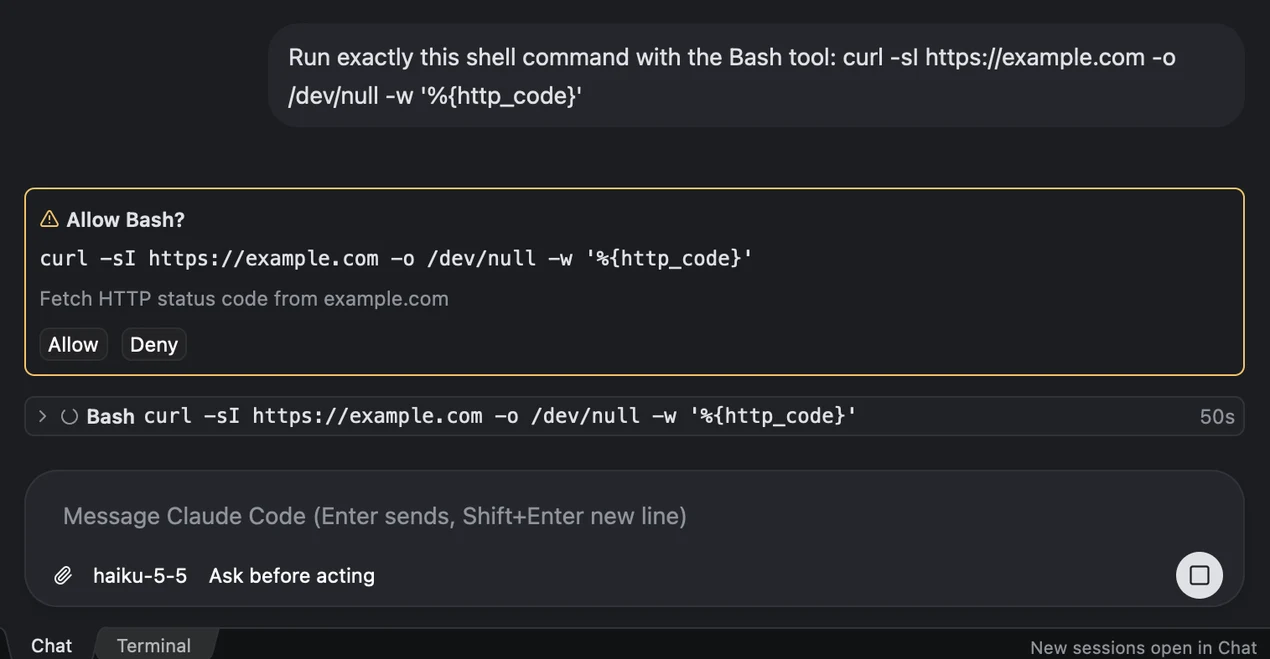
When the agent asks to run a command, the request appears in the chat with the exact command and two buttons. The session's dot turns yellow in the list, so you notice it while you are working in another session.

A permission prompt in the chat, titled Allow Bash?, showing the exact curl command the agent wants to run, a short description, and Allow and Deny buttons. The tool call waits below it with a spinner.

Skills

Read the skills the agent will use.

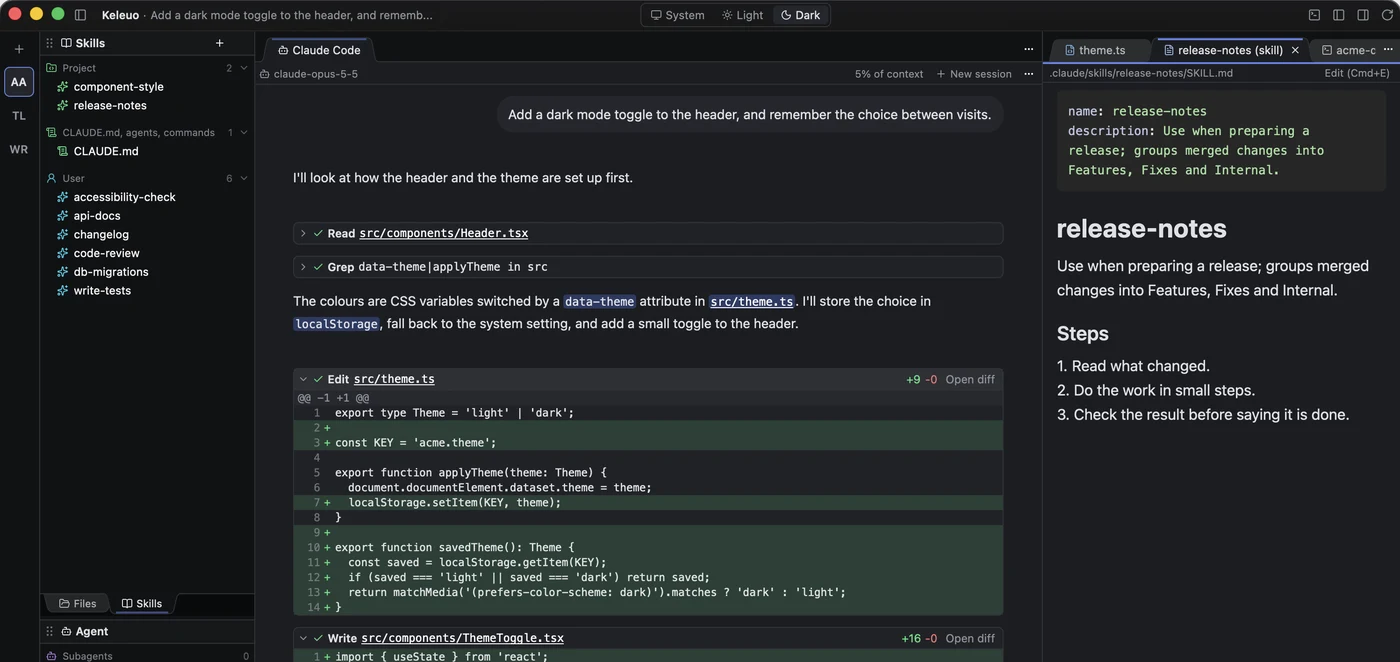
The skills panel lists everything available to the project, grouped by where it comes from, with each skill's description. Open one and it renders beside your work; press edit to change it in place.

The skills panel lists project and user skills. The conversation is in the middle, with file reads and edits as cards, and a release-notes skill file is open on the right, rendered with its name, description and steps.

Editor

A real editor, not a preview.

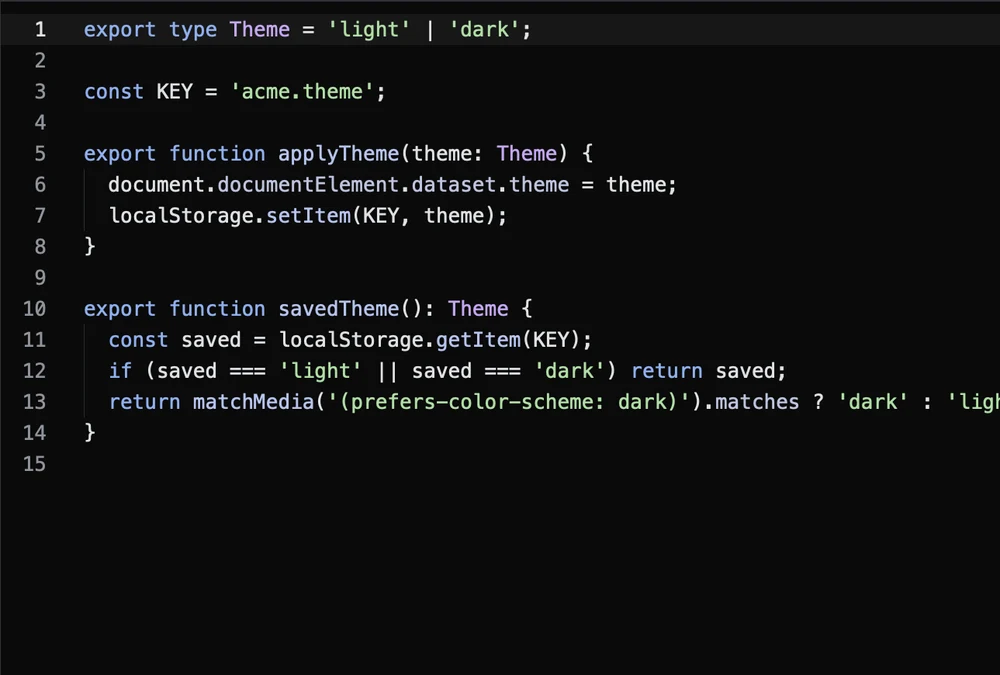
Syntax highlighting and go to definition and back, in the same window as the agent, so you can check its work where it happened. Large files stay smooth: a 50,000-line file opens in milliseconds.

The editor showing a TypeScript file, theme.ts, with syntax highlighting and line numbers: a type, a constant, and two functions that save and apply the theme.

Session browser

Pick up where any session left off.

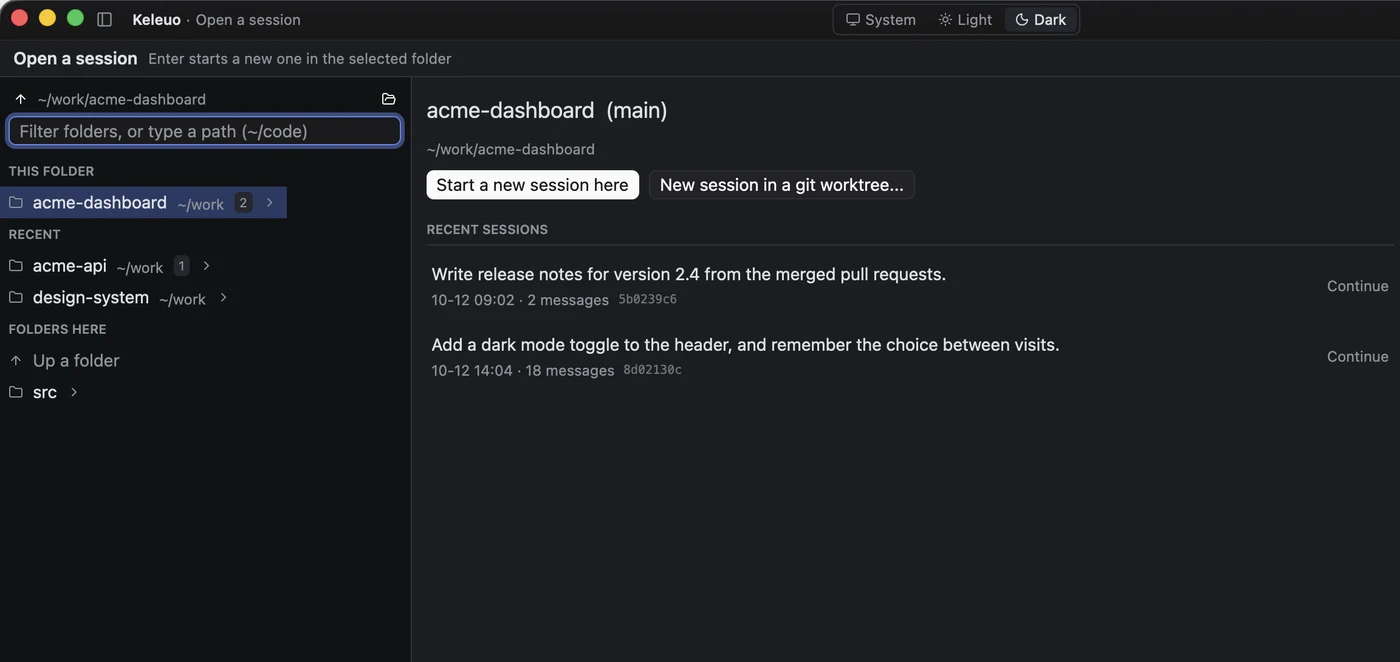
Open a folder and Keleuo lists the sessions that ran there, newest first, including ones still running. Continue a session, fork it to try another approach, or start fresh in a new git worktree so two sessions never edit the same files.

The session browser for a project folder: recent folders with their session counts on the left, and on the right the folder's most recent sessions, each with a Continue button, plus buttons to start a new session or one in a git worktree.

Speed

Native, and it feels like it.

Keleuo is written in Rust on gpui, the GPU-accelerated UI framework behind the Zed editor. No browser engine inside, no waiting.

  • ~150msfrom launch to the first window
  • ~0%CPU while it sits idle
  • 50,000lines in one file, open in milliseconds

Measured on an M-series Mac.

Where it stands

Working today, and what comes next.

Works today

  • Sessions as workspaces with live status
  • Chat and Terminal views of one agent process
  • Permission prompts, diffs, subagent tree
  • Skills panel, file tree, editor, terminals
  • Session browser with continue, fork and worktrees

Coming

  • Remote sessions over SSH
  • More coding agents through the same interface
  • Downloads and the public repository

Wundur AI, open source

Open source, under the Apache 2.0 License.

Keleuo started as a tool for our own work. Running many projects and many agent sessions at once, we needed something native, fast and easy to work with that fit how we actually work.

Keleuo is made by Wundur AI Learning, LLC.